Quota you can read
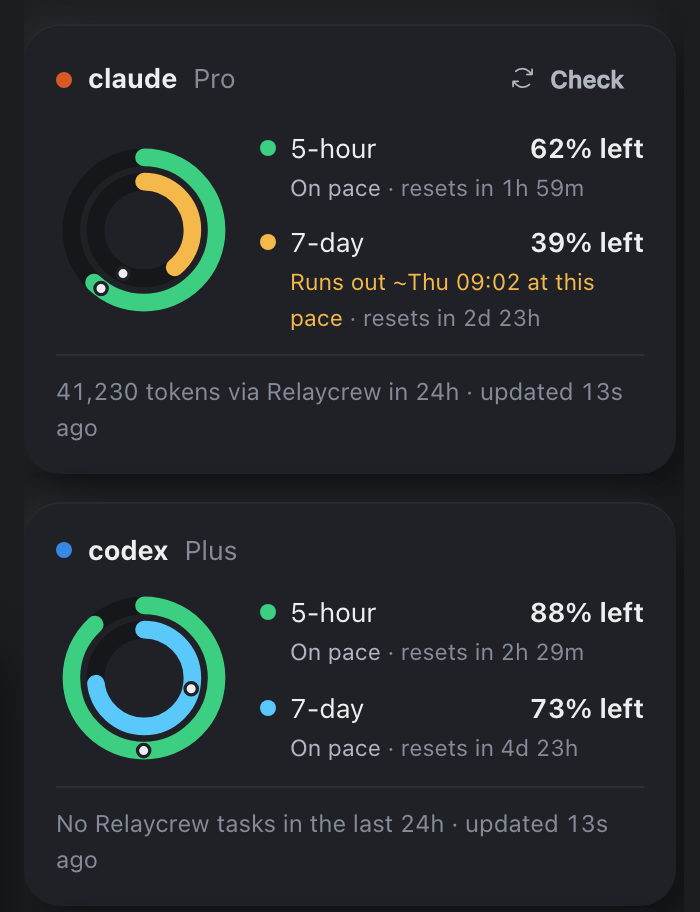
Each subscription gets a ring for its 5-hour and 7-day windows. A dot marks how far through the window you are, and the ring turns amber when you are on course to run out early.
Describe a task. Relaycrew splits it across Claude Code, Codex and Antigravity by strength and remaining quota.
Scripted demo, made-up numbers
Type the task in plain words. Commands still run as commands.
See which agent gets each step. Nothing touches your files until you say yes.
Steps run in order with tokens and time. A failed step moves to the next agent.
Notes about the project are kept in its own folder and given to the next task.
Ask in plain words at the bottom. The plan appears right above it for you to approve, each step's activity streams above that, and the rings on the right show what every subscription has left. Light or dark, following your Mac.
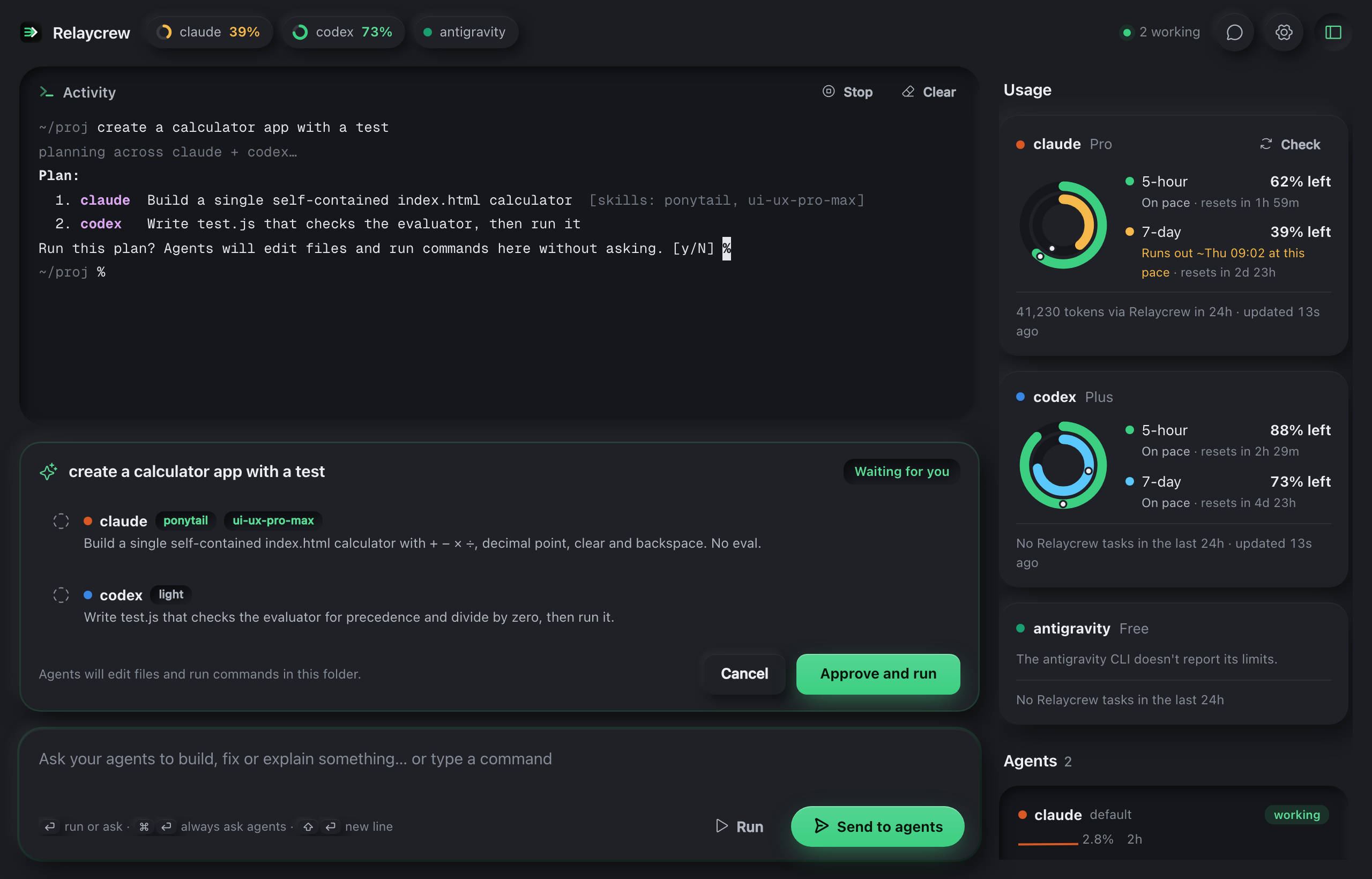
Each subscription gets a ring for its 5-hour and 7-day windows. A dot marks how far through the window you are, and the ring turns amber when you are on course to run out early.
When an agent errors out or hits its limit, Relaycrew says why and retries that step on another one you have switched on.
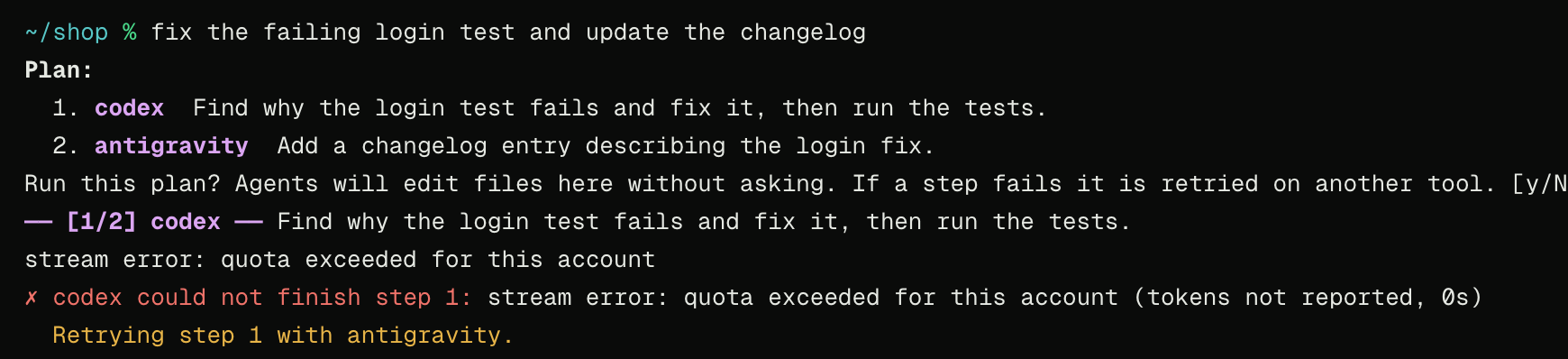
Simulated Codex failure from our test suite
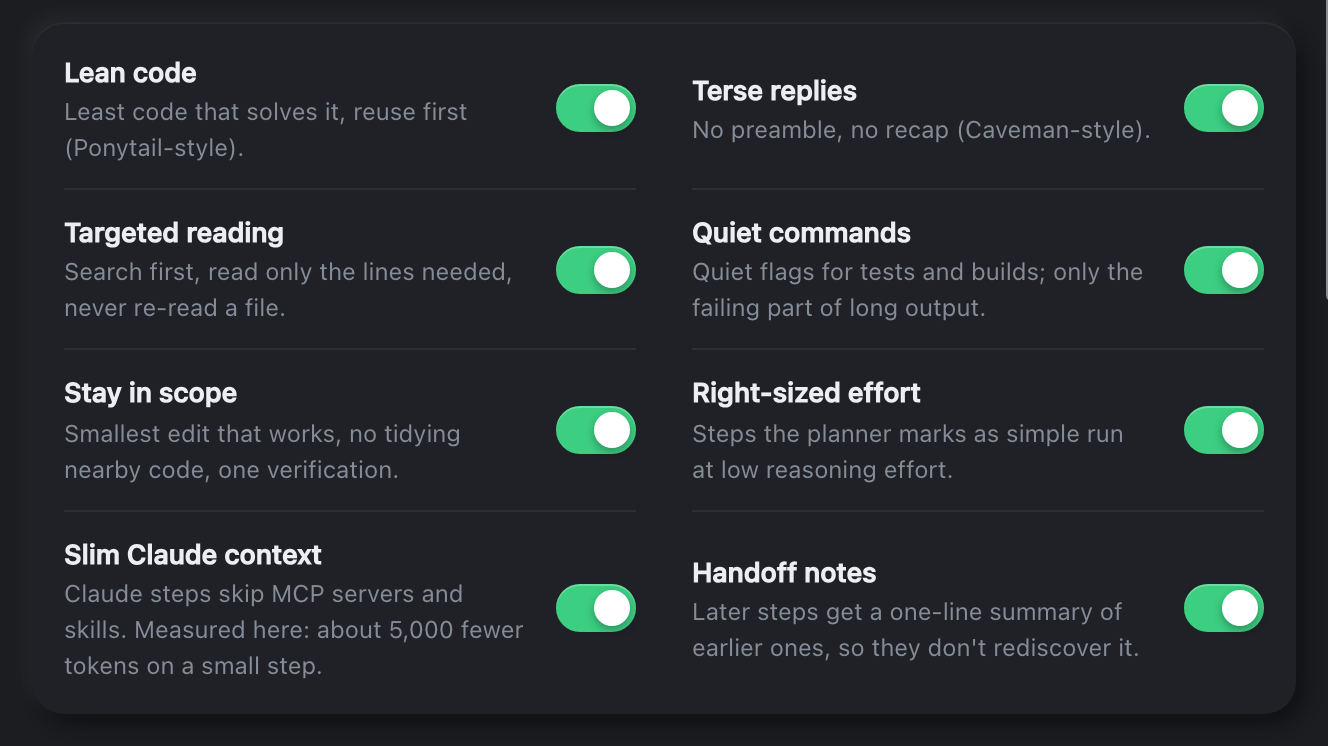
Eight switches and three built-in habits keep each step lean. The one measured so far, on a small Claude step:
20,078 → 20,078 tokens
Agents leave notes in the project's .relaycrew folder. The next task starts already knowing them.
Example notes
Model, status, CPU and running time, including agents you started somewhere else.
No account, no Relaycrew server, no telemetry. Your agents keep using their own logins. The one exception is phone control, which stays off until you switch it on.
Only in Relaycrew
Your Claude and Codex subscriptions reset every few hours, and whatever you didn't use disappears. Most windows end with plenty left over: capacity you paid for and never used. Relaycrew turns it into finished work while you're busy with something else.
git merge. Don't like it? Delete the branch and nothing happened.New
Claude's rewind only knows Claude's edits. Relaycrew snapshots your files before every step, so you can undo one step or the whole task, whichever agents did the work and whatever commands they ran. Your staging area and history stay as they are, and Redo brings it all back.
New
Tokens don't tell you much on a subscription. Every task ends with what it actually cost you: how much of each 5-hour and weekly window it used, per agent, so you know what a feature costs before you ask for the next one.
New
Relaycrew keeps a track record of every step in each project: who finished it, who failed and at what. The planner reads it, so the next step goes to the agent that has actually done that kind of work well in this codebase.
Pair your phone with a QR code and send tasks or commands, approve plans, stop a run and watch the activity, while Relaycrew works on your Mac. You choose how long the phone stays connected, from one hour to four days.
Paste an MCP server link in Settings, with a token if it needs one, and Claude can use that service during a task: your issue tracker, docs or database. The planner knows it's there.
A GitHub repository, a folder or a single SKILL.md: paste it in Settings and the skill is installed with its files. Relaycrew attaches it to the steps where it fits, so you never have to mention it.
The same panel opens as an editor tab, in the folder you are working in. It shares settings and usage history with the desktop app.
.vsix file for Apple Silicon Macs, from the downloads below.Extensions: Install from VSIX. Or use the terminal, below.Relaycrew: Open.curl -fsSL -o /tmp/relaycrew.vsix \
https://github.com/Dhruv9995/relaycrew-site/releases/latest/download/Relaycrew-vscode-darwin-arm64.vsix
code --install-extension /tmp/relaycrew.vsixUse cursor or code-insiders instead of code for those editors.
Using Claude Code? Paste relaycrew.web.app and ask it to install the Relaycrew VS Code extension. It finds step-by-step instructions for coding agents in llms.txt, checks your Mac and editor, installs it and confirms it worked.
Each one drives the same engine the app ships with, and the interface ones click and type like a person would. Failures are forced with stand-in agents, so the awkward cases get tested without spending anyone's quota. Open a group to see every check.
Free while it is in early testing. You bring the agents and their subscriptions.
Checking the latest release.
Apple Silicon Macs, M1 or newer. Signed and notarized by Apple.
64-bit installer. Early build with fewer features.
Apple Silicon Macs. Installs from a file.
Planned. It has not been built yet.
curl -fsSL -o /tmp/Relaycrew.dmg \
  https://github.com/Dhruv9995/relaycrew-site/releases/latest/download/Relaycrew-mac-arm64.dmg
hdiutil attach -nobrowse -quiet -mountpoint /tmp/relaycrew-dmg /tmp/Relaycrew.dmg
ditto /tmp/relaycrew-dmg/Relaycrew.app /Applications/Relaycrew.app
hdiutil detach -quiet /tmp/relaycrew-dmg
open /Applications/Relaycrew.appYes. It is signed with a Developer ID and notarized by Apple, so it opens like any other app. If an older download says it is damaged or cannot be verified, download it again.
Claude Code, Codex and Antigravity. Relaycrew finds whichever of claude, codex and agy are installed and signed in on your machine. It does not include or resell any of them.
Yes, through Claude. When a task mentions Chrome, a browser, a tab, a website or a link, the Claude step can open pages, click, fill in forms and read what is on screen in your own Chrome. Install Anthropic's Claude in Chrome extension and sign in with the same Claude account first.
No. There are no Relaycrew servers. It runs the agent programs already on your computer, and each one talks to its own provider exactly as it does when you run it yourself. If you switch on phone control, what you send from the phone, the plan and the last lines of activity pass through Google's Firebase so the phone can show them.
It puts quota you'd otherwise lose to work. Later saves a task instead of running it now. When one of your subscriptions is within an hour of resetting with at least a quarter unused, Relaycrew runs the oldest saved task without asking, in a separate copy of the project on a new git branch, and commits the result there. Your working files are never touched; the side panel shows the branch, and you merge it if you like it. It needs a git project, and you can switch it off in Settings.
Yes, while Relaycrew is open on your Mac. In Settings, under Phone, switch on control from your phone, choose how long the phone stays connected (one hour up to four days) and click Pair a phone, then scan the code with the phone's camera. When the time is up, the phone is cut off until you pair it again. The phone can send tasks and commands, approve or cancel plans, stop a task and follow its progress. A paired phone can run anything you could type on the Mac, so only pair your own, and use Unpair all phones if one is lost. Phone control is off by default.
You approve the plan first. After that, agents edit files and run commands (tests, builds) in the folder you ran the task in without asking again, so use it in a project under version control. If you don't like the result, Undo puts the files back.
Yes, in a git project. Before each step Relaycrew takes a snapshot of every file git can see, including ones you haven't committed. In the task panel, Undo task puts everything back as it was before the task, and Undo from this step keeps the earlier steps. It works the same whichever agent made the change, and it leaves your staging area, branches and commits alone; files git ignores aren't touched. Edits you made after the task are undone too (you're warned), and Redo brings it all back. From a terminal: relaycrew --undo. Snapshots last about two weeks.
A quick planner looks at what each agent is good at, how much quota each has left, and this project's track record: which agent finished or failed which steps here before. That record is a plain file, .relaycrew/record.md, that you can read or delete. If a step still fails, it moves to the next agent.
How much each subscription window moved while the task ran, from the usage figures Claude and Codex report themselves. It's shown when the task ends and in the task panel. Anything else using the same subscription at the same time, like a chat in another window, counts too.
Short notes and a log of finished tasks, as plain text files in a .relaycrew folder inside each project. You can read, edit or delete them, and switch the feature off in Settings.
It is an early build. The installer exists, but the list of running agents and typing tasks in plain words are not wired up on Windows yet.